
Toy Story Birthday Invitation Website with RSVP | Girl Pink Jessie Cowgirl | Two Infinity and beyond Canva template with RSVP and music
$13.60$24.73

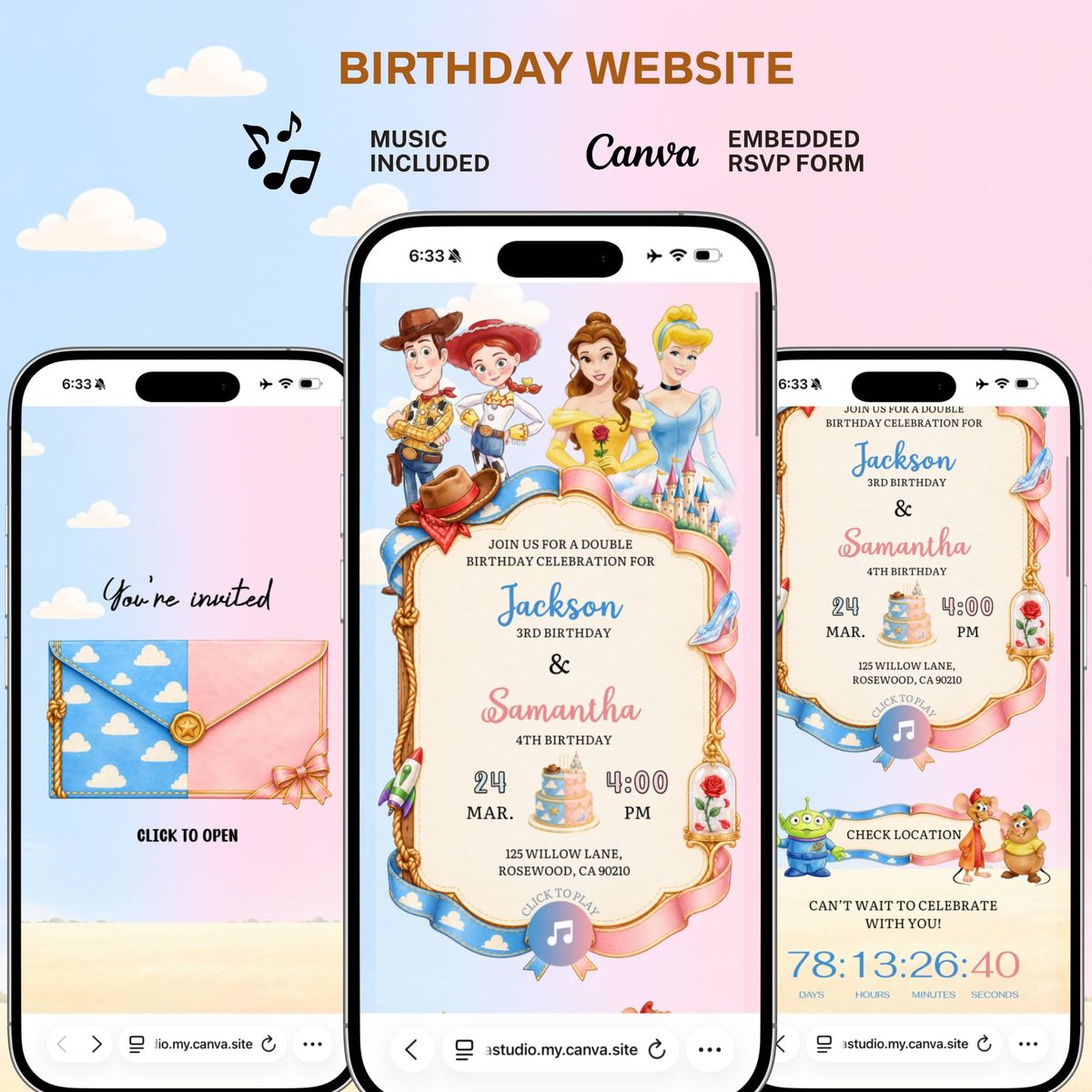
Toy Story & Princess Double Birthday Website Template | Editable Canva Invitation | Kids Joint Birthday Party Celebrate two little stars with one magical birthday celebration! This enchanting double birthday website template combines the adventurous world of Toy Story with the timeless elegance of Disney princesses, creating a unique invitation for siblings celebrating their special days together. Featuring Woody, Jessie, beloved princess-inspired illustrations, pastel blue and pink colors, elegant decorative frames, and a charming storybook design, this digital birthday website is a beautiful way to invite family and friends to a memorable joint birthday party. Make your celebration extra special with an interactive website that brings your party details to life and makes sharing your invitation simple and convenient. **✨ WEBSITE FEATURES** - Editable Canva birthday website template - Unique double birthday party design for two children - Toy Story and princess-inspired theme - Beautiful pastel blue and pink color palette - Interactive envelope-style opening page - Background music feature - Birthday countdown timer - Customizable names, ages, date, time, and venue - Clickable location button for easy navigation - RSVP form for guest responses - Mobile-friendly website layout - Shareable website link for family and friends **🎉 PERFECT FOR** - Sibling Double Birthday Parties - Brother and Sister Birthday Celebrations - Joint Birthday Parties for Kids - Toy Story Birthday Parties - Princess-Themed Birthday Parties - Boys and Girls Birthday Celebrations - Unique Digital Birthday Invitations **📦 WHAT YOU'LL RECEIVE** - Editable Canva birthday website template - Template access link - Customizable party invitation details - Instructions for editing and publishing your website **💻 HOW IT WORKS** 1. Purchase the digital template. 2. Open the Canva template using the provided link. 3. Personalize both children's names, ages, party date, time, and location. 4. Customize the available elements to match your celebration. 5. Publish your website and share the link with your guests. **📌 IMPORTANT INFORMATION** - This is a digital product. No physical item will be shipped. - A Canva account is required to edit the template. - Music, countdown, location, and RSVP features may require setup before publishing. - Editing options depend on the template elements and available Canva features. - This is an independently designed digital template and is not an official Disney product or affiliated with Disney or Pixar. Bring two birthday celebrations together with one unforgettable invitation! This double birthday website is designed to make your children's special day even more memorable with a creative, colorful, and interactive digital experience. IMPORTANT We do not claim ownership over the character clipart or characters. They belong to their respective Copyright owners. We only charge for our time organizing, editing, cleaning, resizing, and designing. All copyrighted and trademarked characters belong to their respective Copyright and trademark holders. 🤍COPYRIGHT NOTICE🤍 This listing is strictly the creative service to produce this item. Any copyright and trademark rights associated with the character images used in the item belong to their respective owners and are not being sold. This item is not a licensed product, and I do not claim ownership over the characters that have been incorporated. By purchasing this item, you are paying for my time creating it, not the images being provided.
Your guests open one link with the story, event details, RSVP, gallery and directions. Everything looks great on a phone.
Open full screen demoSome interactive features like the RSVP form only work in the full demo. Open it here
Still unsure about something? The Joyva assistant is one click away.
You will receive instant access to your editable Canva website template along with detailed instructions on how to customize and publish it.
No. All templates are designed to work with a free Canva account.
Yes. Once added to your Canva account, you can edit it as often as needed.
Absolutely. You can upload your own photos and replace any existing images in the template.
Sign in to Invitarium first, then open Sarah's shared project and make your copy. Double-click the music-player project, replace the audio with an MP3 under 20 MB, and choose Copy link. In Canva, select the music icon, choose Edit link, paste the finished player link, then scale it down to fit the circle.
Select the hidden YouTube frame and increase its transparency so you can see it. Click an empty area so no other element is selected, then paste your YouTube link into the hidden video frame. Canva should embed the video, not add a regular hyperlink. Resize it until its play button sits over the decorative play button, then return its transparency to 0%.
No. Canva websites currently only allow music to play after a visitor clicks the play button.
If you're using a Canva form: Click the form on the Canva editing page, and a horizontal menu will appear at the top with the "Responses" option. You can click it to track all responses there, with the ability to link to a sheet. On mobile, this horizontal menu will be at the bottom.\n\nIf you're using a Google Form: On the same form editing page, you can find the "Responses" tab at the top middle. You can also enable email notifications by clicking on this tab, then the three dots, then enabling email notifications.
Toy Story Birthday Invitation Website with RSVP | Girl Pink Jessie Cowgirl | Two Infinity and beyond Canva template with RSVP and music

Girl Toy Story Birthday Website Template | Editable Canva Birthday Invitation with RSVP, Photo, Music & Countdown | Toy Story Party Website

Cow Girl Jessie Toy Story Birthday Invitation Website Template | Editable Canva Birthday Invitation with RSVP, Photo, Music | Toy Story

Toy Story Birthday Invitation website with music and RSVP | Cute watercolor boy Birthday invitation | Digital Editable Birthday template