
A Little Pumpkin Is On The Way Baby Shower Website Invitation | Girl Pink Bow Baby Shower Invite | Editable Canva Website with RSVP
$13.60$24.73

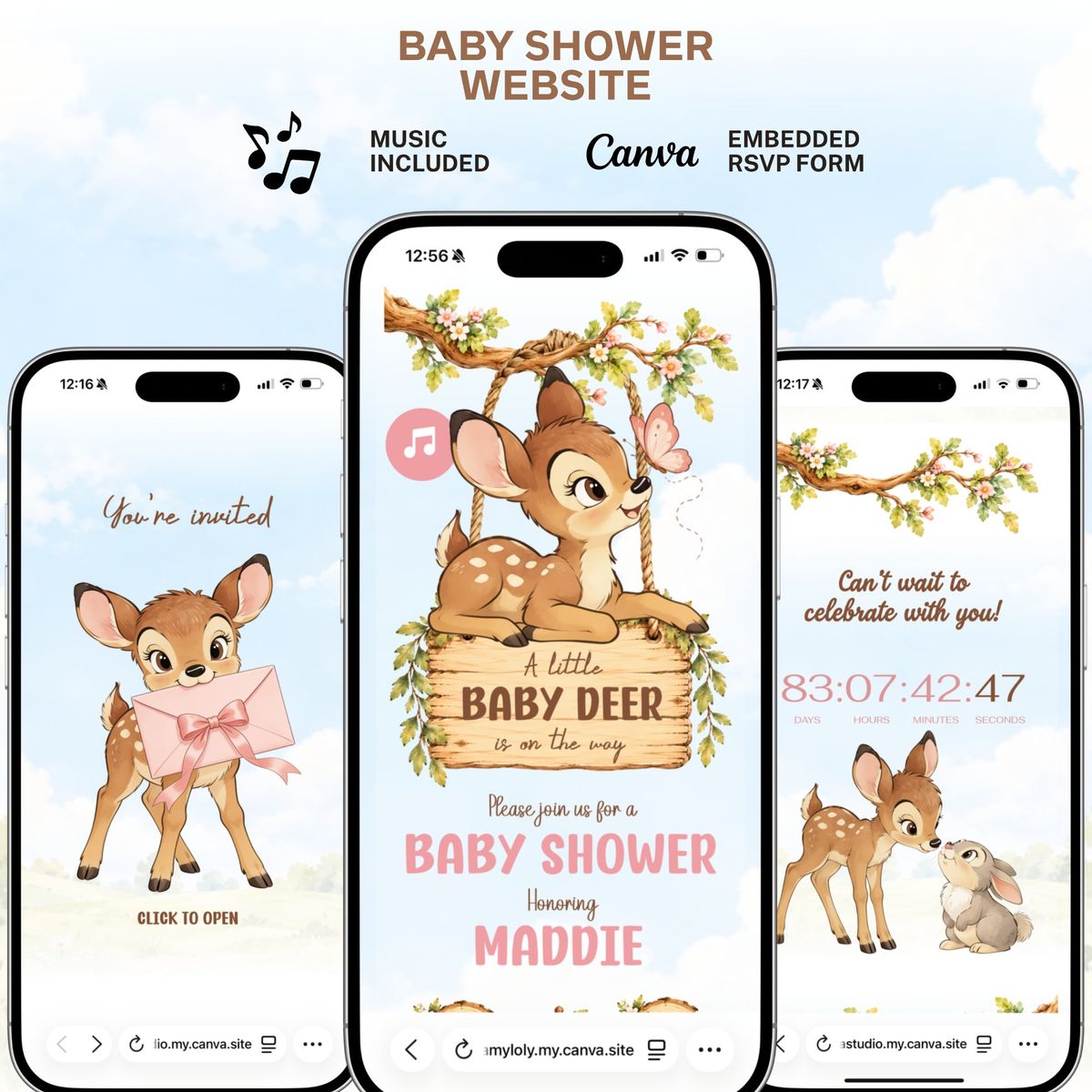
Bambi Baby Shower Website Invitation | Pink Woodland Girl Canva Template | Baby Deer Is on the Way | Editable RSVP, Music & Countdown Invite 🔗 Live Demo Website: 👉 https://dreamyloly.my.canva.site/bambi-baby-shower ✦••——————————————••✦ 🦌 A Little Baby Deer Is on the Way... Celebrate your little one with this Pink Bambi Baby Shower Website Invitation. Featuring Bambi and woodland friends, flowering branches, a hanging wooden sign, and soft pink accents, this editable Canva template brings a sweet forest setting to your celebration. Guests are welcomed by Bambi holding a pink envelope with a ribbon bow. A click-to-open entrance, music, a celebration countdown, and an embedded Canva RSVP Form complete the invitation experience. Perfect for Bambi baby showers, baby girl celebrations, pink woodland themes, and “A Little Baby Deer Is on the Way” showers. Personalize your Bambi invitation in Canva, publish it as a website, and share one beautiful link with your guests. No coding or design experience needed. ✦••——————————————••✦ 🌸 Personalize It Your Way ✔ Edit names, invitation wording, and event details ✔ Customize fonts and colors to suit your celebration ✔ Change the music to your preferred song ✔ Adjust most design elements in Canva ✔ Personalize your Canva RSVP Form ✔ Edit using Canva on desktop, tablet, or mobile ✦••——————————————••✦ 🌿 Website Sections • Click-to-open welcome featuring Bambi holding a pink envelope • Main baby shower invitation with Bambi and a floral wooden sign • Celebration countdown featuring Bambi and a woodland friend • Music player • Embedded Canva RSVP Form ✦••——————————————••✦ 🤎 Why Joyva Studio? • A sweet Bambi baby shower invitation experience • A memorable digital alternative to traditional invitations • Easy customization with a free Canva account • Publish your invitation online and share one link • Designs thoughtfully arranged with care by Joyva Studio ✦••——————————————••✦ 📱 How It Works 1. Purchase this listing. 2. Instantly download the PDF containing your Canva access link. 3. Open the template in your free Canva account. 4. Customize your Bambi baby shower invitation. 5. Publish it as a website and share your unique link or QR code with your guests. ✦••——————————————••✦ ❓ Frequently Asked Questions Do I need Canva Pro? No, you can personalize this template with a free Canva account. What can I edit? You can edit text, event details, fonts, colors, music, and most design elements. Is music included? Yes! The Bambi invitation includes music, and you can change it to your preferred song. How does RSVP work? Guests can respond through the embedded Canva Form. Responses are collected without requiring Google Forms or another external service. Can I edit it on my phone? Yes! You can personalize the template using Canva on desktop, tablet, or mobile. How do I send my invitation? Publish your customized website in Canva, then share its link or QR code with your guests. ✦••——————————————••✦ 📥 Instant Digital Download This is a digital product. No physical item will be shipped. ✦••——————————————••✦ 🔒 Terms of Use • Instant digital download. No physical product will be sent • Personal use only. Do not resell, share, copy, or redistribute • The artwork and visuals included in this template are uniquely created for Joyva Studio and are protected by copyright • Purchase does not transfer ownership or copyright of the artwork • No refunds due to the nature of digital products SEO Keywords: Bambi baby shower website invitation, pink Bambi baby girl shower, baby deer is on the way invitation, editable Bambi Canva template, woodland baby shower website, Bambi invitation with music and RSVP
Your guests open one link with the story, event details, RSVP, gallery and directions. Everything looks great on a phone.
Open full screen demoSome interactive features like the RSVP form only work in the full demo. Open it here
Still unsure about something? The Joyva assistant is one click away.
You will receive instant access to your editable Canva website template along with detailed instructions on how to customize and publish it.
No. All templates are designed to work with a free Canva account.
Yes. Once added to your Canva account, you can edit it as often as needed.
Absolutely. You can upload your own photos and replace any existing images in the template.
Sign in to Invitarium first, then open Sarah's shared project and make your copy. Double-click the music-player project, replace the audio with an MP3 under 20 MB, and choose Copy link. In Canva, select the music icon, choose Edit link, paste the finished player link, then scale it down to fit the circle.
Select the hidden YouTube frame and increase its transparency so you can see it. Click an empty area so no other element is selected, then paste your YouTube link into the hidden video frame. Canva should embed the video, not add a regular hyperlink. Resize it until its play button sits over the decorative play button, then return its transparency to 0%.
No. Canva websites currently only allow music to play after a visitor clicks the play button.
If you're using a Canva form: Click the form on the Canva editing page, and a horizontal menu will appear at the top with the "Responses" option. You can click it to track all responses there, with the ability to link to a sheet. On mobile, this horizontal menu will be at the bottom.\n\nIf you're using a Google Form: On the same form editing page, you can find the "Responses" tab at the top middle. You can also enable email notifications by clicking on this tab, then the three dots, then enabling email notifications.
A Little Pumpkin Is On The Way Baby Shower Website Invitation | Girl Pink Bow Baby Shower Invite | Editable Canva Website with RSVP
Princess Baby shower Invitation website with RSVP | Pink Gold Fairytale Baby shower | A little princess is on her way | Royal baby shower

A Little Gentleman Is on the Way Baby Shower Website Template | Tuxedo Preppy Bear Invitation | Editable Canva Website with RSVP & music

Fairy Baby shower Invitation Website RSVP, Fairy first Enchanted Garden Theme, Fairy woodland invite | A little fairy is on her way
